Showing posts with label livestream. Show all posts

September 05, 2013

YouTube Offers 24/7 Live Streaming


With the recent announcement that the "Old" YouTube live streaming platform would be deprecated, the YouTube live team announced from the YouTube Live product support group that the new platform will now offer 24/7 streaming. Previsouly live events were limited to 36 hours on the v2 platform - and then automatically ended.

This is good news to many live streaming producers such as 24/7 newscasters, podcasters, and 'web' cams such as animal cameras. 

The v2 YouTube live streaming platform was introduced at the beginning of the year - and it offered an industry first for free live streaming by transcoding single high bit rate encoded streams into multiple - equal and lower bit rate viewer streams - saving bandwidth and processing on the head end.

This announcement continues YouTube's trend of upgrading their live streaming platform.

September 02, 2013

YouTube Live Mini Conference


YouTube will offer its first conference for live streaming on October 25th 2013.

The single day event will be held at the YouTube Space LA - a new facility with over 40,000 square feet of studio space, sound stages, cameras and editing equipment.

Live events on YouTube have increased dramatically this year after a series of announcements offering the feature to many channel owners. The latest statement from YouTube in August offered live streaming to any channel with at least 100 subscribers.

On Labor Day YouTube Creators posted on their Google+ Page that anyone with the YouTube live feature enabled on their channel were open to attend the limited seating YouTube Live Mini Convention.

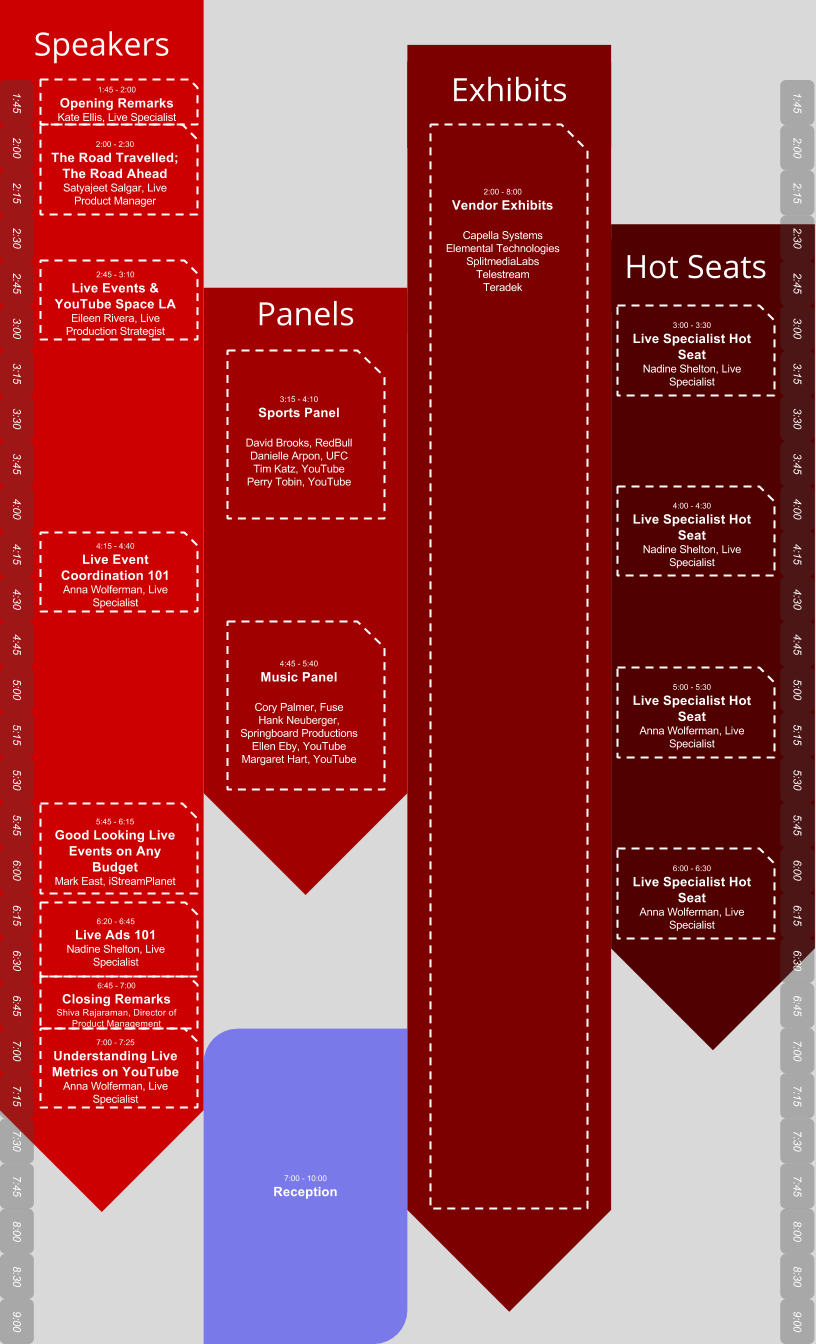
The registration site, which will be active September 3rd, says that the day of sessions will feature industry professionals, vendor demonstrations, and workshops. See the Schedule below. 

The conference may not be offered elsewhere and may be your only time to get direct communication with YouTube's live streaming department staff.  The Live Team stated that there are no plans at this time to offer this event at their New York offices.  

Got questions for the speakers or panelists? Submit them here! 

Event Schedule


Presentation Descriptions


YouTube Live: The Road Travelled; The Road Ahead
Our live product manager discusses the latest and the future of the platform.
Live Events & YouTube Space LA
A review of the live streaming tools you can take advantage of as a Space LA Creator.
Live Specialist Hot Seats
Take the opportunity to grill a Live Specialist with your live streaming questions.

Sports Panel
Live sports creators and YouTube sports specialists take your questions on how to optimize your live efforts for the genre. 
Live Event Coordination 101
Learn how to juggle all of the different pieces and prepare yourself to go live!
Music Panel
Live music creators and YouTube music specialists take your questions on how to optimize your live efforts for the genre. 
Great Looking Live Events on Any Budget 
A 14-year industry veteran offers tips for making your live events look as polished as possible-- regardless of what you have to spend!  
Live Ads 101
We'll review live monetization and basic troubleshooting tips. 
Understanding Live Metrics on YouTube
Walk through the live streaming metrics available on YouTube.

Speaker Bios

Kate Ellis, Live Specialist
Kate is the Lead Live Specialist at YouTube working with the global teams to develop the live events platform.  She started working with live streaming in 2003 and since joining YouTube has worked on many key events across sports, music, politics, entertainment, and more. 
Satyajeet Salgar, Live Product Manager
Satyajeet is the the Product Manager for Sports, News and Live on YouTube. He tries to make live on YouTube a little more awesome everyday.
Eileen Rivera, Live Production Strategist
Eileen is a Production Specialist at YouTube Space LA managing all live streaming shows. She previously produced live streaming at This Week in Tech, CNET, Revision 3, and has produced shows for HGTV, History Channel, Travel Channel and TechTV.
David Brooks, RedBull
David is the Manager of Digital TV and Video Programming at Red Bull Media House, and has developed the global video strategy for Red Bull over the past seven years. Most recently he played a key role in developing the Red Bull Stratos live partnership with YouTube, a group that went on to be awarded a National Sports Emmy for Outstanding New Approaches Sports Event Coverage.
Danielle Arpon, UFC
Danielle is the Manager of Video Distribution for the Ultimate Fighting Championship, the world's premier mixed martial arts promotion. Danielle and her team provide promotional content, transactional video on demand, and live streaming products across all of the UFC's digital platforms.
Tim Katz, YouTube
Tim is a member of the YouTube Sports team in San Bruno. He oversees relationships with broadcasters, action sports, and golf partners. Prior to YouTube, he worked at ESPN.
Perry Tobin, YouTube
Perry is a senior technology manager responsible for Sports. He manages the YouTube partnerships with major league sports such as MLB, NBA and other YouTube live sports partners. 
Anna Wolferman, Live Specialist
Anna is a Live Streaming Specialist at YouTube and was a part of the Emmy-winning team who streamed Red Bull Stratos live on YouTube.  Prior to working at YouTube, Anna was a Digital Events Manager at AEG Digital Media and a Production Coordinator at iStreamPlanet.
Cory Palmer, Fuse
Cory is a Digital Channel Manager at Fuse, where he led the launch of Fuse's live streaming concert series in 2011. He has worked on all of Fuse's live streaming events, including major concerts such as 12-12-12: The Concert for Sandy Relief and Swedish House Mafia Live at Madison Square Garden.
Hank Neuberger, Springboard Productions
Grammy-winner Hank Neuberger, President of Springboard Productions, has been webcasting music festivals since 2005. In 2013 Springboard produced multi-channel webcasts for the Coachella, Bonnaroo, Lollapalooza, Outside Lands and Austin City Limits Festivals.
Ellen Eby, YouTube
Ellen works with YouTube music partners from a technical and operational stand point. She worked on YouTube's live stream Hangouts with music artists such as Taylor Swift and Bruno Mars.
Margaret Hart, YouTube
Margaret is a member of the YouTube Music team in Beverly Hills. She focuses on artist and label relations, specializing in artist education, and direct artist deals. Prior to YouTube she worked in digital media, and distribution at William Morris Endeavor.
Mark East, iStreamPlanet
Currently Executive Director of Live Event Operations for iStreamPlanet, Mark has been producing live streaming events both big and small for over 14 years. YouTube events he has overseen include the 12.12.12 Benefit concert, the 2012 Democratic National Convention, the TomorrowLand, TomorrowWorld and Ultra music festivals as well as many others. 
Nadine Shelton, Live Specialist
Nadine has gained experience in Streaming Media, Television and Ad Operations over 14 years.  Credits include MTV's Room Raiders and Design Invasion.  She was also the first global Ad Trafficker for Roo Inc.
Shiva Rajaraman, Director of Product Management 
Shiva leads the product team at YouTube focused on Creators ensuring that anyone who can entertain, inspire, or inform can achieve their viewership and revenue goals. Shiva is also focused on ensuring there is a thriving ecosystem around YouTube that extends our core platform into verticals and services that weren't imaginable before YouTube existed and are essential to helping creators succeed.

Exhibitor Descriptions

Capella Systems develops Cambria Live, a software based streaming video production platform that provides exceptional HD video quality and broadcast-level features. It integrates the latest YouTube Live API which allows professional broadcasters to stream contents seamlessly to YouTube Live channels. 
Elemental Technologies is the leading supplier of video solutions for multiscreen content delivery. Providing unmatched solutions for more than 300 leading media franchises worldwide, Elemental helps pay TV operators, content programmers, film studios and sports broadcasters bring video to any screen, anytime – all at once.
SplitmediaLabs Limited is an innovative, Hong Kong-based, software company specializing in the development of multimedia applications and technology. SplitmediaLabs is the developer and publisher of XSplit Broadcaster, one of the most popular applications for live Internet broadcasting, with a user base ranging from teenage hobbyists to prominent professional casters. 
Telestream is the maker of Wirecast and Wirecast for YouTube, cross-platform live-streaming production software. We help you create powerful, memorable, professional productions and deliver your content where you need it, to YouTube and beyond.
Teradek is an innovator of wireless video devices and platforms that facilitate creative acquisition and live event broadcasting in full HD. Teradek's H.264 encoders, bonding devices, and latency-free transmission systems are used throughout many industries for aerial video capture, live ENG backhaul, real-time monitoring, and webcasting.

Other Discussions around the web:

On Twitter:
#YouTubeLiveCon #YouTubeLive

YouTube Live Conference - Friday October 25th, 2013 Discussion on Google+

YouTube Live Conference - Friday October 25th, 2013 Discussion on LinkedIn http://lnkd.in/b9865ms

YouTube Live Conference - Friday October 25th, 2013 Discussion on Facebook


August 22, 2013

The Downside of YouTube Live?

by Bern Rexer

I recently replied to a post on a social network asking if there was a downside to YouTube live streaming and if it will succeed. It was a difficult to offer a succinct response - i've always been challenged with brevity! But here is my take...


I've seen nothing but continual growth and overall improvement with YouTube live since it began. But it is not as mature right now as similar services regarding features or technical support. 

I think support is proportional to price but I'd consider Google's philosophy regarding support and product knowledge is to rely on the G+ social network which is a fine strategy. Most Google+ products offer approachable community managers - but not so much with YouTube yet. 

However the YouTube Live Streaming Guide is documented well and the YouTube Live Support Forum is adequate - occasionally a YouTube rep will respond (most replies are from contributors). But direct communication with YouTube live support is probably limited to top tier producers. As well a 'Contact Us - direct email consultation' support link was recently added to the YouTube help guide. Your channel is eligible for support if you have more than 15,000 hours of watch time over the last 90 days. When you click the link, the system automatically provides access based on your viewer analytics. 

Remember that Google, including YouTube, is a MASSIVE and very complex operation. They don't have the human resources to offer a typical support system. They also change so quickly that a typical support system is not practical. 

Support for live streaming services is almost always concerning network issues and connectivity. But since YouTube has now opened up live streaming to most (anyone with at least 100 subscribers) - there has been a noticeable deluge of basic user operation questions. Sure, encoding can be a complex task. Still, if something is not connecting then I'd like to call a network operations center or speak with my account rep - which most other services offer if your paying for it. And unlike other streaming services, YouTube does not share their network infrastructure or who they partner with - which to me offers an idea of assurance. I can only assume that the Google CDN for live streaming is (big?) and continues to build out. 

Anyhow, CDNs have always had a reputation regarding congestion and stability. I'm so far pretty happy with the YouTube's network capability and buffer spinners are only occasional. 

The biggest benefit, and why YouTube live streaming will succeed is because of the G+ network. But also, because of Google's massive infrastructure, resources and subsidy to YouTube it will prevail.  

But that doesn't mean that Ustream, Livestream and others will go out of business. Most producers don't like change - and most viewers don't care about the platform or brand as long as they easily see the video. BTW the guys a Livestream are fantastic regarding service and passion to their work - and are very capable of pivoting for continual service offerings. 

To really understand Google and YouTube live start engaging through a G+ account, build your circles, and follow the YouTube Live Streaming Google+ Community.

Happy Streaming! 
:o)
-B

August 02, 2013

YouTube Live Streaming 100 Subscribers

YouTube Live Streaming is now available for channels with 100 subscribers.
by Bern Rexer

Previously your channel required 1000 subscribers for live streaming. This news heard from VidCon opens up live streaming considerably for anyone with a YouTube channel.

It was also announced in the YouTube Creators Blog http://youtubecreator.blogspot.com/2013/08/investing-in-you-more-tools-to-build.html and confirmed on the YouTube Live Operations product forums:
YouTube Live Access Expanded

If you have more than 100 subscribers then check your account features and select Enable for Live events.
http://www.youtube.com/account_features

June 01, 2013

YouTube Live Streaming service brand?

By Bern Rexer

How should the YouTube Live Streaming Services be branded? 

Because... there doesn't seem to be one. I'd love to hear something official from someone. 

But does it really matter? Is anyone in a rush to brand YouTube live webcasts at this point? By now we've all learned about YouTube live streaming. So maybe they don't need to further brand each individual feature that they offer. Possibly more changes are in the future where it is too early to brand these features? Maybe they can wait a little longer to see what the general consensus says. 

But that has always been the problem. Because there never has been popular consensus about what to call live video on the Internet.  
Live streaming as a service has always struggled with terminology. It has changed over the years and has been referred to differently by different industry. 

What seems to be the a popular brand reference to YouTube live streaming right now is the portmanteau - livestream. But Livestream is a service company and possibly a trademarked brand. YouTube Live is also reference but it is not always used by Google or YouTube. 

So what should the YouTube live streaming services be called?

I've been back and forth between YouTube Live and YouTube Live Streaming. I've also mentioned YouTube Live Events. How about YouTube Live Broadcast?

Here is a list of the many terms we've heard over the years referring to live video on the Internet. Please add any I've missed:
Web Conference
Webinar
Web Seminar
Webcasting
Internet Broadcasting
live streaming
livestreaming
livestream
webcasting
hybrid events
hybrid meeting
econference

~

Back in 2002 we made fun of the many confusing terminologies during a spoof video about web conferencing.
Watch the segment here at the 68 second mark:
Agoraphobics Webcast Live Stream Live Webcast Spoof

:o)

#YouTubeLive   #LiveStream   #MXPI   #Livestreaming   #YouTubeLiveStreaming  

Originally posted on Google+ 
https://plus.google.com/113251903012045208366/posts/buYR7Jkqtmo

By Bern Rexer

April 02, 2013

YouTube Live Streaming is Brilliant Marketing Strategy #BestVideo

By Bern Rexer

On March 31st Google began promoting it's annual April Fools Day pranks for many of it's products. It seems that each Google program try's to outdo themselves with the most over the top gimmick.

YouTube got in on the act by live streaming a Nominee Announcement Ceremony. The description from the live event Watch page said:

Every video uploaded over the past eight years is under consideration to win YouTube. Our presenters will be announcing all the nominees for 12 hours every day over the next two years. 


Many hours before the live stream started, scheduled at Noon EDT, it was apparent YouTube was on to something. The audience engagement began after the Watch page URL, where the video is displayed, was posted from a few promotional links.

Promotion also came from a teaser video which displayed over 3 million views before the live event started.

Audience engagement included a few thousand concurrent viewers, according the the Watching Now stats, interacting through the comments section several hours before the event began.

I found the link after my daily perusing of the YouTube Live listings. And noticed right away the large viewing Watching Now count before the event began.
Large view counts are intriguing for any videos on YouTube. And it is hard not to click through a live event with a large Watching Now audience to discover what the attraction is.
So I clicked and as the page opened - a black slate appeared with a countdown clock and there was the comments section updating frequently. It was the comments that everyone was drawn to. You can build your audience engagement before the event begins by enabling and encouraging comments.

Promoting the live event included YouTube sending out a few Tweets with the hashtag #BestVideo and a Google+ Post

If you aren't a Google+ user yet your are missing out on hyper charged rankings from your posts and some neat data called Ripples which show how a G+ post spreads over time and offers a nice graphic representation. +Larry Page was one of the big influencers for the live event post.

Google+ Ripples


As the show began we were introduced to YouTube's Submission Coordinators Donald Hurley and Kendra Fuller. (Donald looks too young to be the dad of +Chad Hurley don't you think?)


Donald Hurley and Kendra Fuller
And for the next twelve hours they started to read from red cards with the YouTube logo, each video which had been submitted to YouTube since 2005. They didn't even leave the set during breaks which were scattered through the show as interstitial playbacks of Nominee Spotlights.

Various lower third and other graphics were used throughout the show including the Twitter feed hash tag. There were suggestions from the graphics encouraging the audience to vote if Kendra or Donald would eat spaghetti or hot dogs for dinner. But there were also suggestions to submit your video using the hash tag. The results were impressive. The YouTube Live Event topped trends on on all social networks and flooded the Internet with YouTube links which were submitted from YouTubers in hopes of getting their videos mentioned during the live stream.  If you have a video on YouTube this show made you think about it.

The webcast appeared to use the newly introduced live streaming experience known as the New Platform, which offers YouTube live streaming producers multiple bitrate selections up to 1080p transcoded from one encoded stream. It also offers DVR capability where the viewer can scrub back to the beginning or any previous spot of the broadcast. This was a nice feature if you wanted to go back in time to see if your YouTube video had been read - I'm still searching if my old YouTube video got mentioned. If the DVR option is enabled when producing a live event, then the archive is available almost immediately after the live event is complete. I noticed this event after being twelve hours long was available as an archive within a  few seconds after conclusion - same watch page with view counts and comments intact.

One of the many funny moments during the live stream, and a break in the routine towards the end, was Donald Hurley thanking his family and that he wouldn't see them for the next two years at the 11:12:45 mark.

The live event concluded with weary Kendra and Donald being tucked in to cots on set by a stage hand so they could awake April 2nd to begin again. But I didn't see the event listed from the YouTube Live page today. Maybe this really was a joke.


Some notable stats I observed:
Over 400K (and counting) comments from the Live Event Watch page.
Over 50K new subscribers to the YouTube channel page.
Concurrent views up to 25K and over 500K unique views. The archive will surely top 1 million views before the end of today.

I'd consider this live Internet broadcast a historic YouTube event for many reasons including the duration and the numbers. But also because it set a great marketing precedent of how to use a live event to build brand awareness and created audience engagement. I think the event it is an advertising case study for utilizing live streaming to market your brand or message.

YouTube continues to solidify it's ubiquitous brand for video consumption. Nice job YouTube for 'winning' the Google April Fools competition. I'm looking forward to watching next year!

:o)
BR

~

Some takeaways if you are an internet marketer or event producer:
  • The audience feels connected to each other through the event and the live event can produce tremendous audience engagement while it all happens real time. 
  • A live event is a single time and place where a group of people come together to talk about the same thing. Live streaming brings the event to each remote online viewer.
  • Real time messages during live events are powerful - you know your audience is present and listening.
  • Viewer profiles who posted via YouTube comments, Twitter, G+ or any profile based social network can be logged for future marketing efforts.
  • Crowd sourcing link submission during a live event from your audience is a way to get your domain links online. 
  • A well produced annual or serial event will seed your audience for the following event. 

Questions:

  • Do you think because of the thousands of additional YouTube videos posted by users during this live event - YouTube gained ad revenue?
  • Do you think they gained additional brand awareness?


March 20, 2013

YouTube Live Event Landing Pages

By Bern Rexer

Consider what landing pages to drive your audience to view a live event on YouTube. There are several options to plan before your live stream.

This article discusses some options based on the old layout channel - and discusses how the new One Channel layout works for live events.

This article is important because of the benefits of featuring videos on your channel, where you should consider driving your audience to view your live event, and if you should consider changing to the new One Channel if you produce live events. These featured video options don't appear to be offered on the One Channel but additional testing is required.

There are four primary landing page URLs to distribute to your viewing audience - and where you want your audience to view the stream. Consider choosing one of these pages.

  • The YouTube Watch Page
  • Your YouTube Channel Page
  • A YouTube Playlist
  • An embedded player on your web page or other sites.

All YouTube videos ultimately reside on a Watch page. The URL format is
http://www.youtube.com/watch?v=Your-Video-ID
The Watch page is the initial landing page to *consider for your audience. The link can be shared via emails, social networks, Circles or passed through registration applications.
The YouTube default Watch page layout continues to evolve - just like the Channel layout.
*Remember that the Watch page is a source URL - you cannot change the video in it. After you promote it you cannot change it. Often, especially for live events, promote another page for better control.

When you upload an on demand video or create a new live event - there are a few options that will determine what displays on the Watch page - such as the Comments field.
Regardless of where the video is displayed (from your channel, playlist or embedded web page player), the Watch page can always be accessed by the savvy viewer - usually by clicking on the YouTube logo of the player but also by clicking on the title link on the player or page.

You should also consider driving your audience to your Channel page and featuring your live event there. The benefits of Highlighting content on your Channel for your live event is because the audience will see your custom branding and other videos.
You can chose what videos to feature from your main channel page if you are logged in. There is an Edit button above the player on the right which allows you to select the video. This will be your Default featured video.
If enabled to stream live then you also need to setup your channel Tabs from the channel settings page for Live Broadcaster - with Default as Featured Tab - and do not check where subscribed users are taken to the Feed.
Live Broadcaster Tab

You can even chose to feature another channels live or on demand video. The benefit here is that if you are not enabled to stream live - but collaborate with a Partner who is enabled for live streaming - then you can feature that live event from your collaborative partners channel on YOUR channel. To do this - setup your tabs for Everything - create a playlist and add the partners live event URL to it - then feature the playlist. It will show up as the featured live stream on your channel and play the first (or only) video.

The URL format of a featured video is
http://www.youtube.com/user/Your-Channel-Name/featured?v=Your-Video-ID

What if you have two live events that you want to feature on your channel? Your audience will always go to the default featured video from the channel URL or featured URL. But if another live event is occurring from your channel then you can change the video ID in the URL to take users to that video and STILL appear to be featured on your channel.
http://www.youtube.com/user/Your-Channel-Name/featured?v=Your-Video-ID (the default video)
OR
http://www.youtube.com/user/Your-Channel-Name/featured?v=Your-Video-ID-2 (the other live event)
A benefit of this is if you have multiple events at the same time but also if you have multiple audiences for the same event - such as different languages.

If you feature a live event on your channel and it is public then that default featured event appears on your channel from the YouTube live events listing page http://YouTube.com/Live. If the event is not featured on your channel but public - then viewers are taken to the Watch page from the YT public live listings.

Another consideration of where to drive your audience for a live event is to your domain web page. When you create your live event an option is available to allow embedding the video. Select this and you will be able to embed that video to play from your web page. Remember however that anyone else can embed the video to play on their web page if it is public.


~

Here are links to highlighting and featured videos based on the old layout:
Highlighting Content on your YouTube Channel
Change the Featured Video


~

So the big question is - how does this all work on the new One Channel layout?

In my opinion your Channel page or your domain web page are the two most valuable places to drive your audience (but every event is unique). Drive your audience to one place to maintain control of your content. When your viewers go to your channel page and you have a video playing - such as a live event - REGARDLESS if they are subscribers or not - that video is what will draw their attention first.

From my initial tests, the new One Channel layout not only reduces the size of the featured video but it also doesn't allow subscribers to even view that featured video. Maybe I am missing some functionality on the new YouTube One Channel but I think a single playing video on any page is what draws the most attention from the viewer. And when it comes to live events it is extremely important to keep the audience captured.

~

Below are two images of similar YouTube partner's Channel pages - who both produce live events.
The first is Crufts which live streams their dog shows - and uses the current (or old) version layout.
And the other is the Pet Collective which streams various animal cams and uses the One Channel layout.
Crufts Live Event featured on Channel.

Pet Collective Live Events featured on playlist


March 14, 2013

Samsung Galaxy Live Stream Draws Huge Numbers

By Bern Rexer

Samsung broadcast their new Galaxy phone product launch on YouTube and other live streaming services today and the event resulted in over 1 half million concurrent viewers and over ten thousand new subscribers to their YouTube channel. Samsung YouTube Channel.

It is estimated that there were over 1 million visitors to the many live streams broadcast on the internet for the event.


Samsung Galaxy YouTube Live Stream
Pre Event Subscriptions

Samsung Galaxy YouTube Live Stream
Post Event Subscriptions
The live stream began around 7:15pm EDT and lasted about 1 hour. It was broadcast from New York City.

There was over 460K concurrent viewers on the YouTube channel and over 75K concurrent viewers on CNET broadcast from Livestream.com. Other YouTube channels broadcast the event and Leo LaPort's TWiT TV covered it on Ustream averaging about 2500 concurrent connections.

The same live event URL was available as an archive within an hour after conclusion on Samsungs YouTube channel.

~
UPDATE:
24 hours post event Samsung's YouTube channel shows almost 10% increase at 270K subscribers.

March 08, 2013

YouTube Changes Live Encoder Settings


<<< UPDATE >>> here are the latest YouTube Live Encoder settings.

YouTube has made notable changes to their recommended live encoding settings. Particularly with the video bitrate increase for each of the four stream resolutions of 240p, 360p, 480p, and 720p - but also adding a 1080p live streaming resolution. These resolutions can be selected by the viewer from the quality cog adjustment on the bottom right of the YouTube player. 


YouTube's addition of a New Platform suggests encoding a single 6Mbps stream which their media servers then transcode to the lower bitrate streams. 

The bitrates have increased considerably as shown from charts below of the old and new suggestions. 
240p increases from 300Kbps to 500Kbps 
360p increases from 600Kbps to 1000Kbps
480p increases from 1000Kbps to 2000Kbps
720p increases from 2400Kbps to 4000Kbps

OLD recommendations:
OLD encoder settings for YouTube live streaming
OLD encoder settings for YouTube live streaming published by YouTube


NEW recommendations:
NEW encoder settings for YouTube live streaming
NEW encoder settings for YouTube live streaming published by YouTube*

Most YouTube accounts do not have the ability to stream live. Those that are enabled may only have a basic feature of the streaming to a single bitrate of 360p. And some have the enhanced live streaming feature to stream to all four bitrates. Furthermore, YouTube has added a 'New Platform' for live streaming which transcodes a single higher bitrate stream to the lower bitrates. 

YouTube live streaming Old and New Platform
YouTube live streaming Old and New Platform*

Transcoding a single highest bit rate stream down to the lower bit rates and to mobile devices is a big step forward for YouTube live streaming.  A video on the ytliveops YouTube channel discusses transcoding and the new platform. 


*Published from the YouTube Live Streaming Guide 3/8/2013

<<<<<<<<<<<<<<<<<<<<<<UPDATE>>>>>>>>>>>>>>>>>>>>>>>>>>>
YouTube now has updated their encoding suggestions to included a recommended bitrate. This is great news as it shows their is flexibility with encoding bitrate. More testing will determine how the YouTube transcoders  handle dynamic bitrates which is offered by many encoders. 
YouTube Live Recommended Encoding Bitrates

March 07, 2013

YouTube Live Streaming Guide


The YouTube Live Streaming Guide offers insights and instructions for streaming live on YouTube. If you are an enabled partner or just curious about how YouTube live streaming works then browse through this information.
The guide along with this video were updated early 2013.


February 25, 2013

YouTube Live Events Troubleshooter


YouTube Live Events Troubleshooter


A YouTube Live Events Troubleshooter support link is available for viewers of live streaming on YouTube who may be experiencing issues.

The link offers four radio button options - which branch to additional options:


What can we help you with?
  • I'm having a playback issue (audio or video)
  • I'm seeing an error message
  • I'm having a purchasing or billing issue
  • I'm having another issue or would like to provide feedback
The next time you watch a live event on YouTube and have streaming issues then try this out. 

The link can be found here: