Showing posts with label live webcast. Show all posts

August 04, 2014

Bern Rexer YouTube Live Con Guru Panel


YouTube Live Con to host Live Guru Panel.

by Bern Rexer

YouTube will be holding their 2nd 'YouTube Live Con' live streaming conference October 4th 2014 at their headquarters in San Bruno CA. 


The conference will feature exhibits and workshops. And it will feature a panel which I'll be honored to sit at along with other industry veterans. We will discuss the live streaming industry and share experiences about best practices when producing live events on and off of YouTube.

Here is more information from the event website:http://www.youtubelivecon.com/agenda


August 22, 2013

YouTube Live Streaming & Content ID

What is Content ID?

  • YouTube's state-of-the-art technologies let rights owners Identify user-uploaded videos comprised entirely OR partially of their content (as posted from YouTube)

YouTube Live Streaming is also subject to Content ID. 

Be careful that you are not streaming any content which may be in the Content ID system or is copyrighted. 


"If streaming a live event on YouTube that contains copyrighted content you will first receive a warning message... If you continue to stream that content, your event will be stopped automatically and live will be disabled on your channel."


Here are some ways that might get you in trouble:
  • Streaming ambient music - pay attention to who has the radio on!
  • TV shows in the background.
  • Walkin music for corporate presentations or large venues.
  • Video playback from presentations which contain copyrighted material.  
What if you don't have total control of your environment?
  • As stated you will receive a warning so pay attention to the messages in the Live Control Room. Try very hard to work with all artists, presenters, and producers regarding the audio and video elements which may be introduced into your live stream. 
Could you mask the ambient copyrighted material out? 
  • Maybe by having a drum track available to lay into your audio mix you could mask from the Content ID system. But it might be hard to test this! 
Remember that Content ID is a very good system in place to protect your content. But it could cause some inconveniences if you unintentionally broadcast copyrighted material. So be careful.

Tune back to find out if masking works. 

August 15, 2013

Get More Subscribers for YouTube Live

by Bern Rexer
Gain more YouTube Subscribers for YouTube Live
YouTube Subscriber Link
Add subscriptions to your YouTube channel by ASKING ! !

You only need 100 subscribers to get your YouTube channel enabled for Live Streaming.

Provide this URL in your posts and emails - add your YouTube channel name after add_user=

http://www.youtube.com/subscription_center?add_user=

Learn more by joining the YouTube Live Streaming community at
https://plus.google.com/communities/104895156772939756721

August 02, 2013

YouTube Live Streaming 100 Subscribers

YouTube Live Streaming is now available for channels with 100 subscribers.
by Bern Rexer

Previously your channel required 1000 subscribers for live streaming. This news heard from VidCon opens up live streaming considerably for anyone with a YouTube channel.

It was also announced in the YouTube Creators Blog http://youtubecreator.blogspot.com/2013/08/investing-in-you-more-tools-to-build.html and confirmed on the YouTube Live Operations product forums:
YouTube Live Access Expanded

If you have more than 100 subscribers then check your account features and select Enable for Live events.
http://www.youtube.com/account_features

June 01, 2013

YouTube Live Streaming service brand?

By Bern Rexer

How should the YouTube Live Streaming Services be branded? 

Because... there doesn't seem to be one. I'd love to hear something official from someone. 

But does it really matter? Is anyone in a rush to brand YouTube live webcasts at this point? By now we've all learned about YouTube live streaming. So maybe they don't need to further brand each individual feature that they offer. Possibly more changes are in the future where it is too early to brand these features? Maybe they can wait a little longer to see what the general consensus says. 

But that has always been the problem. Because there never has been popular consensus about what to call live video on the Internet.  
Live streaming as a service has always struggled with terminology. It has changed over the years and has been referred to differently by different industry. 

What seems to be the a popular brand reference to YouTube live streaming right now is the portmanteau - livestream. But Livestream is a service company and possibly a trademarked brand. YouTube Live is also reference but it is not always used by Google or YouTube. 

So what should the YouTube live streaming services be called?

I've been back and forth between YouTube Live and YouTube Live Streaming. I've also mentioned YouTube Live Events. How about YouTube Live Broadcast?

Here is a list of the many terms we've heard over the years referring to live video on the Internet. Please add any I've missed:
Web Conference
Webinar
Web Seminar
Webcasting
Internet Broadcasting
live streaming
livestreaming
livestream
webcasting
hybrid events
hybrid meeting
econference

~

Back in 2002 we made fun of the many confusing terminologies during a spoof video about web conferencing.
Watch the segment here at the 68 second mark:
Agoraphobics Webcast Live Stream Live Webcast Spoof

:o)

#YouTubeLive   #LiveStream   #MXPI   #Livestreaming   #YouTubeLiveStreaming  

Originally posted on Google+ 
https://plus.google.com/113251903012045208366/posts/buYR7Jkqtmo

By Bern Rexer

April 02, 2013

YouTube Live Streaming is Brilliant Marketing Strategy #BestVideo

By Bern Rexer

On March 31st Google began promoting it's annual April Fools Day pranks for many of it's products. It seems that each Google program try's to outdo themselves with the most over the top gimmick.

YouTube got in on the act by live streaming a Nominee Announcement Ceremony. The description from the live event Watch page said:

Every video uploaded over the past eight years is under consideration to win YouTube. Our presenters will be announcing all the nominees for 12 hours every day over the next two years. 


Many hours before the live stream started, scheduled at Noon EDT, it was apparent YouTube was on to something. The audience engagement began after the Watch page URL, where the video is displayed, was posted from a few promotional links.

Promotion also came from a teaser video which displayed over 3 million views before the live event started.

Audience engagement included a few thousand concurrent viewers, according the the Watching Now stats, interacting through the comments section several hours before the event began.

I found the link after my daily perusing of the YouTube Live listings. And noticed right away the large viewing Watching Now count before the event began.
Large view counts are intriguing for any videos on YouTube. And it is hard not to click through a live event with a large Watching Now audience to discover what the attraction is.
So I clicked and as the page opened - a black slate appeared with a countdown clock and there was the comments section updating frequently. It was the comments that everyone was drawn to. You can build your audience engagement before the event begins by enabling and encouraging comments.

Promoting the live event included YouTube sending out a few Tweets with the hashtag #BestVideo and a Google+ Post

If you aren't a Google+ user yet your are missing out on hyper charged rankings from your posts and some neat data called Ripples which show how a G+ post spreads over time and offers a nice graphic representation. +Larry Page was one of the big influencers for the live event post.
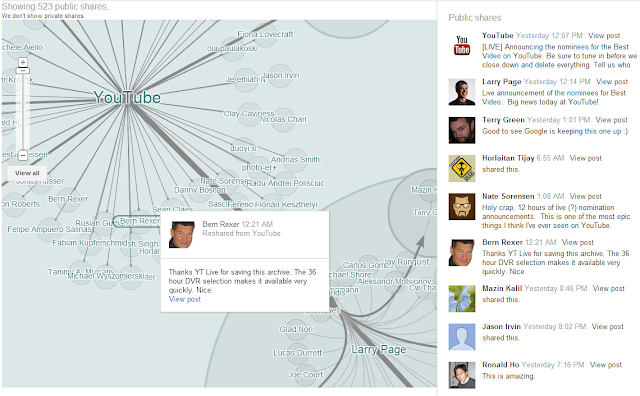
Google+ Ripples


As the show began we were introduced to YouTube's Submission Coordinators Donald Hurley and Kendra Fuller. (Donald looks too young to be the dad of +Chad Hurley don't you think?)


Donald Hurley and Kendra Fuller
And for the next twelve hours they started to read from red cards with the YouTube logo, each video which had been submitted to YouTube since 2005. They didn't even leave the set during breaks which were scattered through the show as interstitial playbacks of Nominee Spotlights.

Various lower third and other graphics were used throughout the show including the Twitter feed hash tag. There were suggestions from the graphics encouraging the audience to vote if Kendra or Donald would eat spaghetti or hot dogs for dinner. But there were also suggestions to submit your video using the hash tag. The results were impressive. The YouTube Live Event topped trends on on all social networks and flooded the Internet with YouTube links which were submitted from YouTubers in hopes of getting their videos mentioned during the live stream.  If you have a video on YouTube this show made you think about it.

The webcast appeared to use the newly introduced live streaming experience known as the New Platform, which offers YouTube live streaming producers multiple bitrate selections up to 1080p transcoded from one encoded stream. It also offers DVR capability where the viewer can scrub back to the beginning or any previous spot of the broadcast. This was a nice feature if you wanted to go back in time to see if your YouTube video had been read - I'm still searching if my old YouTube video got mentioned. If the DVR option is enabled when producing a live event, then the archive is available almost immediately after the live event is complete. I noticed this event after being twelve hours long was available as an archive within a  few seconds after conclusion - same watch page with view counts and comments intact.

One of the many funny moments during the live stream, and a break in the routine towards the end, was Donald Hurley thanking his family and that he wouldn't see them for the next two years at the 11:12:45 mark.

The live event concluded with weary Kendra and Donald being tucked in to cots on set by a stage hand so they could awake April 2nd to begin again. But I didn't see the event listed from the YouTube Live page today. Maybe this really was a joke.


Some notable stats I observed:
Over 400K (and counting) comments from the Live Event Watch page.
Over 50K new subscribers to the YouTube channel page.
Concurrent views up to 25K and over 500K unique views. The archive will surely top 1 million views before the end of today.

I'd consider this live Internet broadcast a historic YouTube event for many reasons including the duration and the numbers. But also because it set a great marketing precedent of how to use a live event to build brand awareness and created audience engagement. I think the event it is an advertising case study for utilizing live streaming to market your brand or message.

YouTube continues to solidify it's ubiquitous brand for video consumption. Nice job YouTube for 'winning' the Google April Fools competition. I'm looking forward to watching next year!

:o)
BR

~

Some takeaways if you are an internet marketer or event producer:
  • The audience feels connected to each other through the event and the live event can produce tremendous audience engagement while it all happens real time. 
  • A live event is a single time and place where a group of people come together to talk about the same thing. Live streaming brings the event to each remote online viewer.
  • Real time messages during live events are powerful - you know your audience is present and listening.
  • Viewer profiles who posted via YouTube comments, Twitter, G+ or any profile based social network can be logged for future marketing efforts.
  • Crowd sourcing link submission during a live event from your audience is a way to get your domain links online. 
  • A well produced annual or serial event will seed your audience for the following event. 

Questions:

  • Do you think because of the thousands of additional YouTube videos posted by users during this live event - YouTube gained ad revenue?
  • Do you think they gained additional brand awareness?


March 07, 2013

YouTube Live Streaming Guide


The YouTube Live Streaming Guide offers insights and instructions for streaming live on YouTube. If you are an enabled partner or just curious about how YouTube live streaming works then browse through this information.
The guide along with this video were updated early 2013.


February 21, 2013

Secure Live Streaming on YouTube using Google+ Circles

By Bern Rexer

YouTube offers privacy options for sharing live streaming through Google+ Circles. This can be beneficial if for example your company has an all employee, all hands or town hall style live webcast and you want to limit the stream to only your employees. Or if you want to offer a live stream of a conference, seminar or live concert - but only to a specific audience - such as those who have purchased the event. Then you can add the audience into your G+ Circle and they will get an invitation email to view the stream.

This method is a way to increase the private event outside of the previous 50 person limit. Each viewer however must have a Google+ account.

This is a very powerful and easy option for secure live streaming on YT. It also leads to some powerful viewer metrics.

Here is the YouTube support link that explains Private and Unlisted Videos on YouTube.

The important paragraph in this support selection is:

  • If you use your Google+ identity on YouTube, you do not have a 50 person limit on sharing, as private video sharing is done to Google+ circles. There is no limit to the number of circles to which a Google+ user can share. 
  • In order to watch a private video, your contacts must already have a YouTube account. If they don't already have an account, they'll first need to sign up for an account. If they do not sign into their account before watching the video, the video will not load.

December 13, 2012

YouTube allows Fuse to collect donations for Sandy Relief


By Bern Rexer

YouTube allowed Fuse, an MSG Inc company, to collect donations through Google for Non-Profits.

Fuse, a television channel dedicated largely to music, streamed '12 12 12 The Concert for Sandy Relief' live on their Fuse YouTube channel.

What was different about this live stream on YouTube is that Fuse is a 'for profit' company, owned by MSG Inc. Yet, a 'Donate Now' button was available from both the Fuse YouTube channel page as well as the live event watch page http://www.youtube.com/watch?v=s5cxpRRmCg8.

Donate Now buttons are usually reserved for IRS Certified 501(c)3 organizations through the Google for Non-Profits YouTube partner program.


Donations in the amounts of $10, $25, $50, $100, and $200 were available for the viewer to select from a drop down menu.

If you are a non-profit organization then you are eligible to receive many Partner features from YouTube including Google Checkout for Non-Profits and Live Streaming. Although Fuse is not a non-profit, their YouTube channel streamed the benefit event live and Google allowed donations to be received through Google for non-profits.

Fuse is owned by Madison Square Garden, Inc. As well, Madison Square Garden in New York City is also the venue where the benefit event took place on December 12th, 2012. Fuse redesigned their YouTube channel with the 12.12.12 event branding.

Over 130K concurrent connections were viewing top act musical artists. The live stream also featured 5 bitrate selections with resolutions of 240p up to 1080p.


The YouTube description field included 'All proceeds go to the Robin Hood Relief Effort. '

More information about YouTube for Non-Profits can be found from the below links.

http://checkout.google.com/seller/npo/

http://support.google.com/checkout/sell/bin/answer.py?hl=en&answer=72721

More information about setting up a non-profit channel can found here:
http://www.youtube.com/t/ngo_tips

http://www.youtube.com/nonprofits

November 09, 2012

YouTube adds 16 Categories to Live Home Page


YouTube's Live Home Page - where a list of all events streaming live or scheduled to stream live appear, has a new layout - adding a list of 16 categories (and new graphics too).
Because YouTube continues to provide its partners the capability to stream live, more live content is being produced. This new layout allows viewers to easily search live content within the following categories. Each category has a dedicated page and is setup similar to an individual YouTube channel where the viewer can subscribe to it.
Subscriptions are sparse with a few channels and Gaming appears to be the most popular.


Sports


News & Politics


Gaming


Music


Google+ Hangouts On Air


Autos & Vehicles


Comedy


Education


Entertainment


Film & Animation


Howto & Style


Nonprofits & Activism


People & Blogs


Pets & Animals


Science & Technology


Travel & Events


Additional notes:

  • YouTube provides special featured events at the very top of the YouTube live home page. 
  • All events that show up on the live listings are created as 'public' events by the channel partner. 
  • Events with more viewers appear at the top of a listing within each category. It appears that if an event is live but there are no viewers, or the event is not receiving a stream (an error message appears) then that live event will still show up in the listings.
  • Although Google+ Hangouts On Air has its own category, there still appears to be HOA events within other categories.

October 30, 2012

The Weather Channel Live on YouTube Spikes Subscriptions


The Weather Channel always gains viewership when major weather events occur. The television coverage of Hurricane Sandy was no different. But after streaming live on YouTube, not only did their Internet viewership increase but The Weather Channel’s YouTube channel subscription rate spiked significantly.

YouTube featured The Weather Channel’s broadcast coverage, less commercials, on YouTube’s Live event page and promoted the event with a notification after a user visited the YouTube site.

YouTube, owned by Google, continues to gain popularity as a site for viewing live events. Previously this month other YouTube channels gained subscribers by streaming live – most notably the 2012 Presidential Debates which were streamed live by major US newspapers including the New York Times , the Washington Post and the Wall Street Journal

Red Bull’s Status event streamed live on YouTube broke a YouTube record of over 8 million concurrent live connections.

According to the stats from SocialBlade and VidStatsX, increased subscription rates may be a direct result of streaming live events. And The Weather Channel's YouTube channel gained thousands of subscriptions during their webcast.

The stats from the YouTube watch page revealed over 7.5 million views during the multi-day live stream.


October 02, 2012

What is the difference between YouTube Live and Google Hangouts on Air

By Bern Rexer

YouTube Live is a feature enabled for select YouTube Live Streaming channel Partners. Google Hangouts on Air is enabled for anyone with a Google+ account and YouTube channel. 

There are some big difference between the two. As of this post here are some of them:
  • A Hangouts on Air (HoA) event is a different appearance and layout of the video - there is a white background, a large main video of who is speaking, up to 9 other G+ members video frames seen on the lower third, and a Google+ bug on the top left corner. 
  • Hangouts on Air, if listed as public, can be seen on the YouTube.com/Live home page under 'Live Now' and 'Recently Broadcasted'. 
  • Hangouts on Air are not promoted under 'Next 24 hours' or 'Next 7 days'
  • HoA stream at lower bitrates and resolution than YouTube Live streaming. 
The two features can be used together and especially useful for remote interviews. The Live Streaming Partner sets up a live event and another G+ member, with a YouTube channel, sets up a separate HoA event. The Live Streaming Partner can take the HoA source and switch into the live stream. Check out HuffPostLive exclusive use of Hangouts on Air.  

Here is the YouTube support description of the two features: 

How can I live stream a Google+ Hangout on my YouTube channel?

Hangouts on Air and YouTube Live are two separate features. Hangouts on Air enables you to live stream your Google+ Hangout on your YouTube channel.  Anyone with a Google+ profile and a YouTube channel in good standing will be able to use Hangouts on Air. 
Visit the Hangouts on Air help center for more information about Google+ Hangouts and Hangouts on Air.

More information about Hangouts on Air can be found here:

More information about streaming your event live on YouTube can be found by contacting LiveEventsChannel@mxpi.com

June 08, 2012


Live streaming on YouTube will change the way we present our media. Think about the power of Google behind media distribution. I think it will disrupt the streaming media CDN marketplace (and much more).

Remember when YouTube offered video uploads and distribution for free? Many thought that business idea wasn't sound. YouTube probably lost a lot of money initially. But now we see they are the second largest search engine of content (behind Google).

It has been a year since YouTube began offering live streaming (see youtube-is-going-live) and they are limiting who has access to the live feature - but rolling it out incrementally.

Live content on YouTube enables exposure to users who otherwise may not have been able to receive that content. This week the International Olympic Committee and YouTube announced that the London 2012 Olympic Games will be streamed live from the IOC YouTube Channel to users in Asia and Sub-Saharan Africa.
~
MXPI is enabled to stream live on YouTube and produces or consults for television and live event producers. I've been webcasting for over ten years along with more than a decade of live television experience and true passion for the technology.

So this Blog is about streaming live on YouTube, the technology required, and methods of process along with opinions and best case scenarios.

Hopefully this blog will answer some questions and generate some discussion -
How does the YouTube Live feature work?
Can your YouTube channel benefit from streaming live?
What equipment or services do I need to stream live on YouTube?

Cheers
:o)
-Bern Rexer